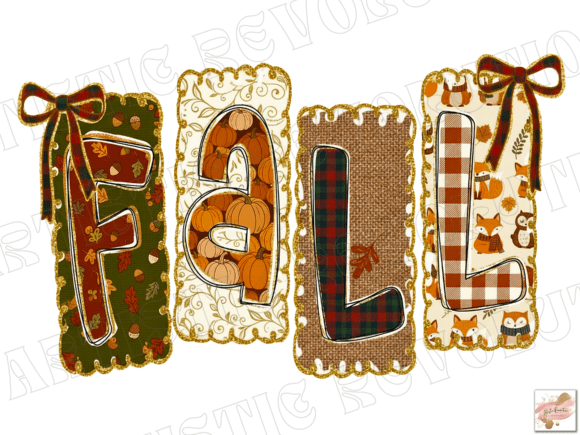
Coquette Fall PNG and Fall Sublimation PNG: A Practical Guide for Creators
The intersection of soft, feminine aesthetics and the warm, earthy tones of autumn has created a unique niche in digital design. If you are looking to create items that capture this specific vibe, understanding the nuances of a Coquette Fall PNG is essential. This style blends delicate bows, vintage typography, and cozy seasonal elements like pumpkins or leaves with a preppy, girly flair. Whether you are designing for a small business or creating personalized gifts, knowing how to properly utilize these files can save you time, money, and frustration.
Many creators rush into purchasing digital assets without fully understanding the technical requirements or design limitations. This often leads to poor print quality, wasted materials, and disappointed customers. By approaching your project with a clear understanding of what makes a high-quality Fall Sublimation PNG effective, you can ensure professional results every time.
Understanding Resolution and File Quality
One of the most common mistakes beginners make is overlooking the resolution of their digital downloads. A Fall PNG might look crisp on your computer screen, but screens display images at 72 DPI (dots per inch), while printing requires 300 DPI. If you purchase a low-resolution file, your design will appear pixelated or blurry when printed on a t-shirt or mug.
To avoid this, always verify that your Fall Coquette PNG is provided in high resolution. For sublimation printing, this is non-negotiable. Sublimation transfers ink directly into the fabric or coating of the item, meaning any imperfection in the source file will be magnified. Before you buy, check the product details. A reputable seller will specify that the file is high resolution and suitable for large-format printing. If this information is missing, it is better to look elsewhere.
Additionally, ensure the file is a transparent PNG. JPEGs have white backgrounds, which will print as a solid white box around your design. This ruins the aesthetic of a Girly Fall Shirt Design, especially if you are printing on colored fabrics. A transparent background allows the design to blend seamlessly with the substrate, maintaining the delicate, airy feel of the coquette style.
Choosing the Right Printing Method
Not all PNGs are created equal for every printing method. A frequent misunderstanding is assuming that one file works perfectly for both heat transfer vinyl (HTV) and sublimation. While a Preppy Fall PNG can be used for various crafts, the preparation differs significantly.
If you are using sublimation, you need a mirror image of your design before printing. Many new entrepreneurs forget this step, resulting in backward text on their mugs or pillows. Always double-check your printer settings. Furthermore, sublimation only works on polyester-coated items or light-colored polyester fabrics. Trying to sublimate a Trendy PNG onto a 100% cotton black hoodie will result in a faint, washed-out image that disappears after the first wash.
For cotton garments, consider using the PNG as a guide for HTV or direct-to-film (DTF) printing. However, if you are sticking to sublimation, stick to light-colored blanks. This limitation is not a flaw in the Autumn PNG but a characteristic of the printing process. Understanding this distinction prevents wasted inventory and ensures your final product meets customer expectations.
Design Composition and Readability
The coquette aesthetic relies heavily on delicate lines and intricate details, such as lace patterns, small bows, and fine script fonts. While beautiful, these elements can pose challenges during production. A common error is scaling the design too small. When a Brushstroke PNG or detailed bow is reduced in size, the fine lines may break up or disappear entirely during the printing process.
To counteract this, test your design at the actual print size before committing to a full production run. Print a sample on paper to check for clarity. If the details are muddying together, simplify the design or increase its size. For items like greeting cards or thank you cards, where the print area is smaller, choose designs with bolder lines. Save the intricate Faux Glitter PNG effects for larger surfaces like canvas prints or backpacks where the detail can be appreciated.
Another aspect to consider is color contrast. The fall palette often includes muted oranges, browns, and creams. If you are printing on a beige or cream-colored shirt, a light brown design may lack visibility. Ensure there is enough contrast between your Halloween or autumn elements and the background material. You may need to adjust the brightness or add a subtle outline to make the design pop without compromising the soft aesthetic.
Licensing and Commercial Use
Before you start selling products featuring your Coquette Fall PNG, review the license agreement. Many digital artists offer personal use licenses by default, which means you cannot sell items made with their designs. If you are an entrepreneur or small business owner, you must purchase a commercial license.
Using a design without the proper license can lead to legal issues and shop closures on platforms like Etsy or Amazon Handmade. Always read the terms carefully. Some licenses allow unlimited sales, while others have caps. Others may prohibit use in certain contexts, such as print-on-demand services where you do not handle the physical production. Clarifying these details upfront protects your business and respects the creator’s work.
Maximizing Versatility Across Products
A high-quality Fall Sublimation PNG is versatile, but each product type has unique requirements. When designing for mugs, remember that the printable area is rectangular, and the design will wrap around. Avoid placing critical text or faces near the edges where they might get cut off or distorted. For pillows, consider the seam allowances. A Girly Fall Shirt Design centered on a pillow might end up partially hidden in the seams if not positioned correctly.
Digital planners and scrapbooks offer more flexibility since there are no physical printing constraints. Here, you can layer multiple Trendy PNG elements, such as leaves, bows, and brushstrokes, to create complex compositions. Use the transparency of the PNG files to overlap elements naturally. This layering technique adds depth and interest to digital products, making them more appealing to consumers looking for unique planner stickers or invitation templates.
Final Checks Before Download and Use
Before finalizing your purchase or starting your project, take a moment to evaluate the preview images. Do they show the design on various backgrounds? Are there close-ups of the details? A trustworthy seller will provide clear examples of how the Autumn PNG looks in real-world applications. Look for reviews from other buyers who have used the file for sublimation or printing. Their feedback can highlight potential issues with color accuracy or file integrity.
Remember, instant download convenience should not come at the cost of quality. Take the time to inspect the file immediately after purchase. Open it in your design software to ensure all layers are intact and the transparency is preserved. If you encounter issues, contact the seller promptly. Most reputable creators are willing to help troubleshoot technical problems.
By paying attention to resolution, printing methods, design composition, and licensing, you can leverage the charm of the coquette fall aesthetic effectively. Whether you are creating Halloween decor, cozy hoodies, or elegant thank you cards, these practical steps will help you produce high-quality, professional results that resonate with your audience.